Symmetry 2026.2 Now Available
Wednesday, 24 June 2026
Symmetry™ process simulation software helps users model process workflows in a single collaborative environment, while integrating pipelines, pipe networks, facilities models, and flare systems to enable consistent thermodynamics and fluid characterization across the whole system. With Symmetry software, users can switch between steady-state and dynamic modeling, optimize processes in upstream, midstream, downstream, and new energy sectors, and maximize the total value of the asset.
Symmetry 2026.2 introduces a range of enhancements, including new capabilities for simulation and case study creation with the AI-based Tela™ for Symmetry software, improved thermodynamic for systems containing ethylene glycol and hydrocarbons, new reaction sets for amine processes, and enhanced usability features for the built-in process flow diagram (PFD) tool, among other additions.
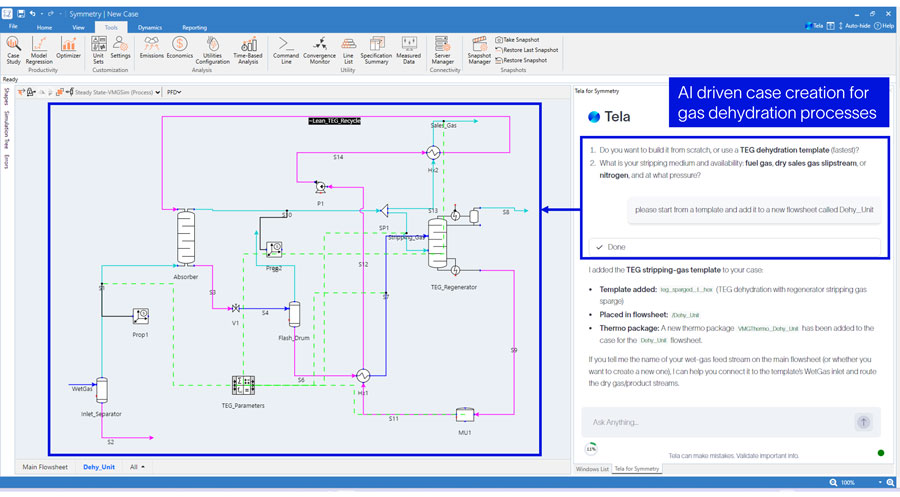
Symmetry 2026.2 introduces enhanced interaction capabilities with the Tela for Symmetry software AI assistant. New interactive workflows have been added to streamline both configuration and analysis of gas dehydration process simulations and enhanced capabilities for automated case study creation.
Tela for Symmetry software provides structured workflows that enable users to select from supported gas dehydration technologies, including TEG (conventional, sparged, and Stahl column), adsorption, and membrane systems. Once a technology is selected, Tela builds a fully configured Symmetry software model aligned with the selection, significantly reducing manual configuration efforts. Users can then interact directly with the generated case to retrieve key information such as stream properties, process conditions, and unit operation parameters or modify inputs including temperature, pressure, flow rate, and composition.
With this release, Tela for Symmetry software offers tools for automated case study creation and modification. Users can create, rename, clone, and delete case studies, as well as efficiently modify them by adding individual or bulk variables. Results can be visualized through plots, with Tela assisting in configuring axes to support faster interpretation of simulation outcomes.
Please note that Tela for Symmetry software is a separate software package available through the Software Download Center (SDC) and must be installed independently, but once installed, it integrates seamlessly with Symmetry software. If you are interested in trying Tela for Symmetry software, please reach out to your SLB point of contact.
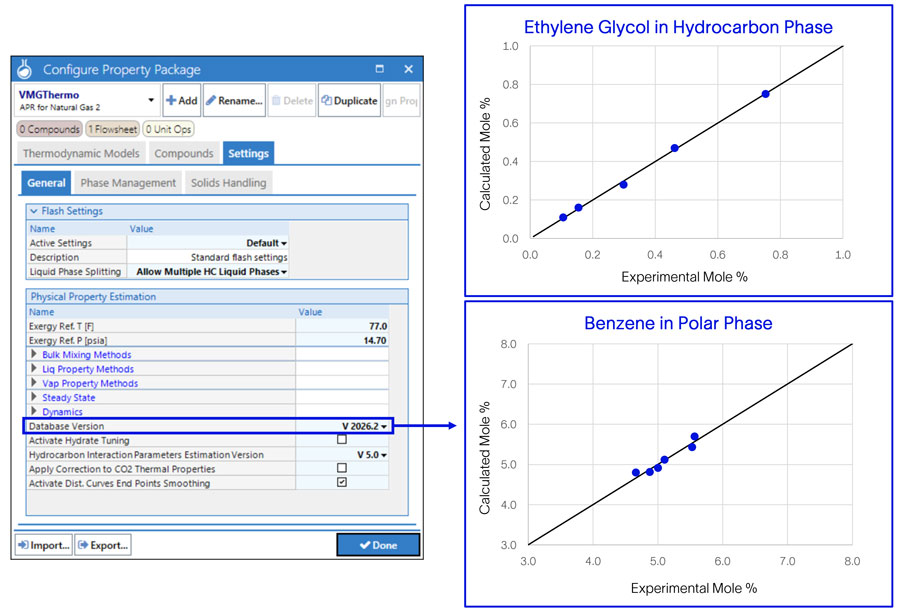
This release includes improved prediction of mutual solubilities for key binary systems involving ethylene glycol with n-hexane, n-heptane, benzene, toluene, and methylcyclohexane, now available in the Advanced Peng Robinson for Natural Gas 2 (APRNG2) thermodynamic model. A new database version (2026.2) with updated interaction parameters is selected by default for all new simulation cases and can be enabled for existing cases through the thermodynamics settings. Results using the updated interaction parameters have been validated against experimental data available for these mixtures.
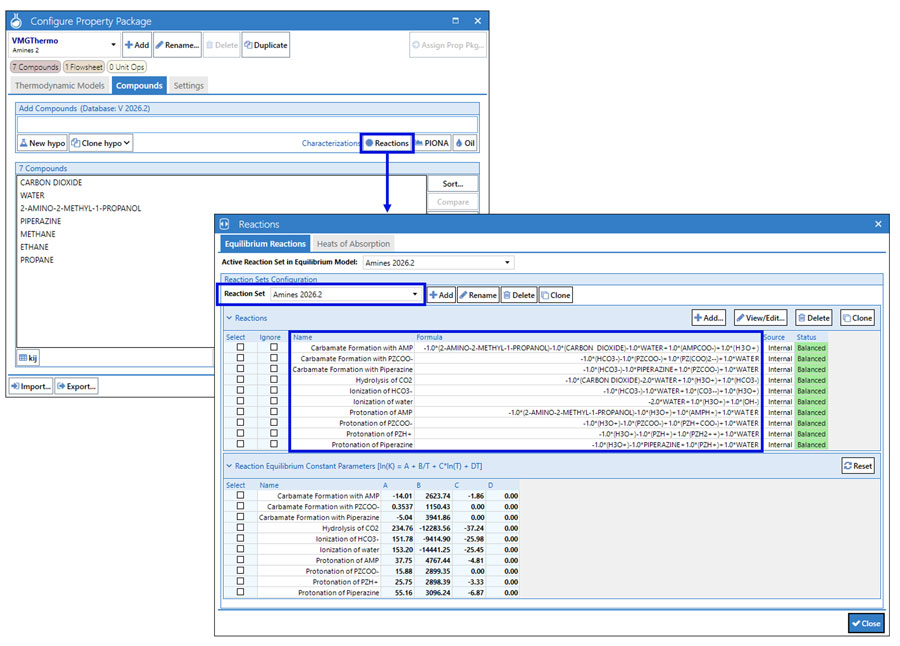
The Amines 2 property package includes a new reaction set, Amines 2026.2. This new set contains acid-base equilibrium reactions written as the chemical dissociation of different compounds and species like water, carbon dioxide, bicarbonate, hydrogen sulfide, bisulfide and protonated alkanolamines. For primary and secondary amines, the set also includes the reversion to bicarbonate to form stable carbamates.
The new reaction sets also allow an improvement in calculation of the solution pH based on the mole fraction of H3O+. The solution pH is now reported in the Amine Detail unit operation, on the Ion Contents tab, when the Amines 2 property package is used with the Amines 2026.2 active reaction set.
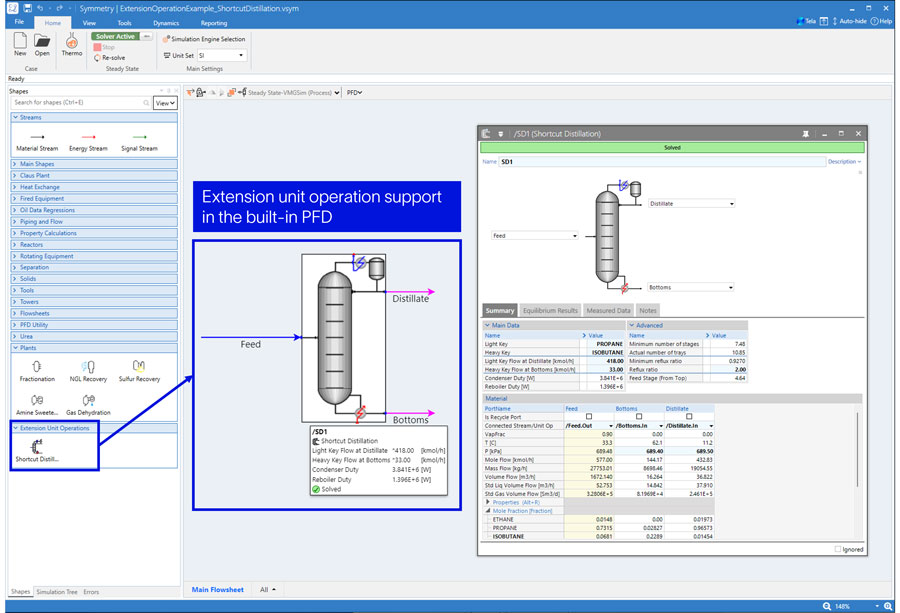
Enhance your experience with expanded capabilities in the Symmetry software built-in PFD. In this release, the built-in PFD introduces support for visualization of extension unit operations. Detailed guidance is available in Symmetry software documentation, including step-by-step instructions for creating new extension unit operations and updating existing ones previously configured for the Microsoft Visio® based PFD to ensure compatibility with the built-in PFD.
Usability and navigation have also been improved. Users can now take advantage of enhanced zoom functionality, including a zoom bar and a convenient Ctrl + Shift + drag shortcut to focus on specific areas of the flowsheet. A new option to ignore shapes allows users to selectively ignore or activate one or multiple unit operations either individually or in bulk through an intuitive right-click menu.
Additional improvements include refined interaction controls, where left-click drag now supports bulk selection of unit operations, and right-click drag enables seamless navigation across the flowsheet. With the release, the built-in PFD expanded localization support to ensure a smoother experience for users operating in non-English environments.
Starting with Symmetry 2027.1 (Q1 2027), the 32-bit Symmetry installer will be discontinued. To use the latest version, all users must install the 64-bit version of Symmetry software. This transition aligns with our focus on enhancing performance, improving security, and maintaining compatibility with modern hardware and operating systems.
For users currently running a 32-bit version, upgrading to Symmetry 2027.1 or later will require either moving to the 64-bit version of Visio or adopting the built-in PFD tool. The built-in PFD does not require additional licensing and removes the dependency on Microsoft Visio®. You may continue using the 32-bit version of Symmetry software until that time.
If you know of any current workflows that rely on the 32-bit version of Symmetry software and could hinder a transition to 64-bit, please reach out to your SLB contact or submit a support ticket as soon as possible.


